
Muslim Xchange Add-In for Excel
Shariah compliance data for 32,500+ stocks and ETFs, as spreadsheet formulas. Verdicts under eight standards, impermissible income, purification and zakat per share — for one ticker or a whole holdings list — without leaving Excel.
Included with Max, Business Advisor, Corporate and Enterprise plans. Works in Excel for Windows, Mac and the web.
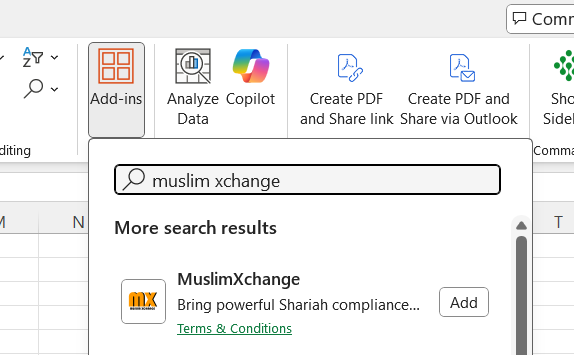
Install and sign in
- Open Excel and click Add-ins on the ribbon (Home → Add-ins, or Insert → Get Add-ins).
- Search for Muslim Xchange and click Add. A Muslim Xchange button appears on the Home ribbon.
- Create an API key on your API keys page (Create key → name it → copy it; it is shown once).
- Click the Muslim Xchange button to open the task pane and sign in with your username and the API key. The pane shows your plan and the data publication in use.
Functions
| Function | What it does | Example |
|---|---|---|
MX.TICKER(ticker, [fields…]) |
Data for one exchange-suffixed ticker. With no fields it returns Result; with several it spills one column per field. |
=MX.TICKER("AAPL","Result","Purification") |
MX.ISIN(isin, [fields…]) |
Data by ISIN. An ISIN listed on more than one exchange spills one row per listing, so you can see and pick the one you hold. | =MX.ISIN("US0378331005","Result","Market") |
MX.FIELDS() |
Spills every field with its type and tier, and whether your plan can read it. | =MX.FIELDS() |
Fields can be given as text arguments, as a cell range of headings (e.g. B$1:F$1), or comma-separated in one text. Tickers use exchange suffixes for non-US listings: ASML.AS (Amsterdam), RY.TO (Toronto), ASML (US listing). Cells recalculating together are sent as batches, so a sheet of thousands of tickers takes a handful of requests.
Fields
Max and Business Advisor read the basic fields; Corporate and Enterprise also read the full fields — the ratio values and per-test results behind each verdict. A cell asking for a field outside your plan shows Not in your plan: FieldName.
| Field | Meaning | Type | Tier |
|---|---|---|---|
Result |
Overall Shariah compliance verdict | text | basic |
NoofStandards |
How many of the eight standards the listing passes (0–8) | number | basic |
AAOIFI, SP, DJIM, FTSE, MSCI, RAJHI, ALINMA, BILAD |
Verdict under each standard: AAOIFI, S&P Shariah, Dow Jones Islamic Market, FTSE Shariah, MSCI Islamic, Al Rajhi, Alinma, Al Bilad | text | basic |
TotalImpurePct |
Total impermissible income as a percentage of revenue | percent | basic |
ImpureSeg, ImpureSegPct, InterestPct |
The impermissible business segment, its share of revenue, and interest income as a share of revenue | text / percent | basic |
Purification |
Amount to purify per share, in USD for every listing | amount | basic |
Zakatpershare |
Zakat per share, in USD for every listing | amount | basic |
Name, Market, ISIN, Sector, Type |
Identity of the listing (Type is stock or ETF) | text | basic |
Old_result |
Verdict in the previous publication | text | basic |
AAOIFIDEBT, DJIMDEBT, SPDEBT, FMCASH, NCAA, … and the …RESULT flags |
Ratio values and the pass/fail of each test under each standard — the working behind every verdict | various | full |
The complete list, with every field’s exact meaning, is in the API documentation — or type =MX.FIELDS() in a sheet.
Examples
One stock, one verdict
→ Compliant
Verdict and purification together
→ Compliant 0.338
A holdings list, using your column headings
Put field names in row 1 (say Result, AAOIFI, TotalImpurePct, Purification, Zakatpershare in B1:F1) and tickers in column A, then in B2:
Fill down. Each row spills its five values, and the whole column is fetched in batches.
Purification for a position
With shares in column G: =E2*G2 gives the purification amount for that holding (USD). Because every listing’s figures are in USD, a plain SUM of that column is a valid total.
A dual-listed ISIN
→ NL Compliant
US Compliant
One row per listing; pick the market you hold, or use the ticker with its suffix instead.
FAQ
Which plans include the add-in?
Max, Business Advisor, Corporate and Enterprise. Max and Business Advisor read the basic fields; Corporate and Enterprise read every field. See plans.
Where do I get the key to sign in?
On your API keys page: create a key, copy it once, paste it into the add-in’s task pane with your username. You can keep several keys (one per device, say) and revoke any of them there.
A cell says Not in your plan: DJIMDEBT.
That field is in the full tier. Everything else in the same formula still fills in; upgrading to Corporate or Enterprise unlocks it.
A cell says #N/A or “Not found”.
The ticker probably needs its exchange suffix (ASML.AS, not ASML, for Amsterdam) or the listing isn’t in the dataset. Try the ISIN with MX.ISIN to see every listing we have.
How often is the data updated?
With each screening publication, quarterly. The task pane shows which publication you are reading; values in your sheet refresh when Excel recalculates.
Are purification and zakat in my currency?
They are per share in USD for every listing, whatever currency the stock trades in — so totals across a portfolio are USD too.
Is there a limit on how many cells I can fill?
No per-account limits on paid plans. The add-in batches requests itself; a sheet of several thousand tickers is a handful of calls.
Can I get the same data outside Excel?
Yes — the HTTP API uses the same key, and members can also connect Claude or ChatGPT.
How do I sign out or switch accounts?
Open the task pane and click Sign out. Formulas stop fetching immediately; sign in again with any key to resume.
Support
Help with onboarding, a team rollout or a formula that isn’t behaving: support@muslimxchange.com. For firms that want the data inside their own systems, see the API.